If you're using a MacIntosh
computer to access the Internet, you might get an error message when
downloading a document. Here's some background info and a quick
solution that usually solves the problem.
PDF
DOCUMENT FILES
Downloadable documents (Scripts,
Teachers Guides, Licenses)
are provided in the universally standard Adobe PDF file format which
works on PCs or Macs. Adobe Reader is the software application which
reads the PDF format, and is available free from Adobe Systems, Inc.
(see below).
NORMAL DOWNLOADS
When you order a
download you get an online RECEIPT web page which has a LINK ("Download",
in blue) below the item name. Your ORDER CONFIRMATION email
also has the same LINK. When you click on the LINK to download the
PDF file, the file should open in Adobe Reader and you should see the
first page of the document.
Downloads
work okay on most Macs, but sometimes (especially when using Safari)
the PDF file might not open and you'll get an error message like...
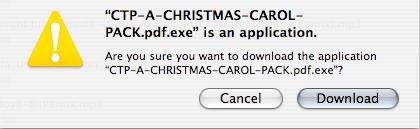
WHAT'S HAPPENING?
If the PDF
file doesn't open it's usually because ".exe" was added to
the end of the file name when it downloaded from the Internet and the
Mac thinks it's a PC executable file (file extension ".exe")
instead of a PDF file (file extension ".pdf"). Here's an
example using A Christmas Carol school play package download:
School play
package PDF file name: CTP-A-CHRISTMAS-CAROL.pdf
File name after Mac download: CTP-A-CHRISTMAS-CAROL.pdf.exe
The Mac tries to process the
file as a PC executable file and doesn't know what to do. Even when
it asks to open the file and you click "Yes", nothing
happens. It's still the exact same PDF file, but now it has an extra
".exe" at the end of the file name.
THE SOLUTION
The solution is to simply remove
the ".exe" from the file name. Then it will open in Adobe
Reader because the Mac sees the ".pdf" as the file
extension and recognizes it as a standard PDF file. Here's what to do:
1.
Download the file to your hard drive (or desktop).
2. Modify
the file name and remove the ".exe".
3. Click
to open the file in Adobe Reader.
That should take care if the
problem. If you still cannot open the PDF file, please let us
know -- send us an EMAIL.